Showing posts with label pc. Show all posts

How to mirror your android Display to PC

| 0 comments |

There are just several reasons you might want to mirror your android display screen to the screen of your laptop or computer, one of them is making the information displayed accessible to a larger audience with the help of a slightly bigger screen.

The android platform provides robust opportunity for its millions of users, Android prides a great collection of apps (apk) thereby making it a great choice for smartphone users. What other reason do you think Blackberry manufacturer and the popular telecommunications company like Nokia are now producing android based mobile phones as well?

Back to the heart of our discussion which is helping you mirror your android display screen to PC. You must have heard about some real-tech-inclined devices that helps you to project information across multiple devices. You can as well do same with your android smartphone by using apps dedicated for this function. One of those app is Allcast app for android.

How to mirror android display to PC Screen


*Youll need to first download the Allcast App to your android smartphone if you dont already have it and there after proceed to download the receiver on chrome.

*Now with your chrome browser on PC download the Allcast Receiver app for chrome.
*Then lauch the mobile app that is mirror beta on your android device

*Then launch the allcast receiver app on chrome browser, to inter-connect both devices youll need to use the same Wi-Fi connection for both devices.

*And Voila!, activities performed on your android devices will be displayed accordingly on your PC

Read More..

5 must have productivity PC tools for writers

| 0 comments |

Gone are the days only Journalist and book publishers are the only people in the business of writing, things have changed a lot more these days and many people are now involved in several activities that involves writing, like writing for business and individual blogs, web copy writing, i-reporting, HARO ( Help A Reporter Out), etc.

Writing can be time consuming and boring as it requires focus and research. However, writers can enhance their writing experience by making use of these 5 must-have productivity tools for writers.

 5 must-have productivity PC tools for writers

Note-taking tools

EverNote, OneNote, Dropbox, Google Keep, Google Doc
Evernote is a great tool especially for writers, it will help you achieve the most important part of your writing career by helping you to archive your ideas and research on the go.

Most copywriters are known to have more ideas than they can write with time, with this note-taking app writers can easily take notes of all their great ideas in one place.

All of this note taking apps will creatively help you keep all of your research in one place thats easily accessible in the cloud.

2. Visual and Infographics tools

You want to stylishly present your content to make it look attractive and fun to read and digest, youll need these tool to carefully come up with great pictorial ideas, graphical and image illustrations in lesser time.

Canva is a drag and drop image creation tool with amazing features. You cant believe how easier your writing will be using this tool. Befunky is a lot similar to canva with less but creative features like cartooning, picture editing etc.

Skitch is the sister tool to Evernote, it makes it easy to add arrows and other graphical illustration to you content, and you can easily sync with you evernote account. Other great resources are photo pin, infogr.am, Gimp, visua.ly, screengrab, memegenerator.net, fotoflexer etc.

3. Save multiple web pages for research

OneTab and Pockets.

Both of these tools are available as add-on on FireFox. oneTab will help you to save multiple webpages in a list to avoid your browser too clumsy as you research your copy.
Pocket is a simple tool that will help you to save unlimited webpages online so that you can read later for your copy-writing.

4. Correct grammatical presentation - Grammarly


Grammarly is a great tool that helps you to fish out typographical errors and as well monitor your use of English. The tool is available as a chrome extension only and its in free and premium versions, the free version has only limited functions like correcting basic errors, suggesting you few replacement synonyms etc.
The tool follows about 250 grammar rules to correct you copies, its a must have tool for heavy copywriters.

5. Copy-drafting and copy-writing


Draft and writer

Both of these tools are promising to give you a distraction free writing environment both online and offline.
These tool keep your work private even online to avoid plagiarism and as well give you a lot of other features like word counts, option to export your documents, writing milestones, formatting and ability to save unlimited documents.

Draft is another feature-rich tool like writer. With draft you rarely need someone else to edit your copies. Its known as a copy-editing engine in that it offers tons of features for adept copy-writing.

Over to you now. What tools do you use to enhance your writing experience? Use the comment section to share them and their features.
Read More..

Cara Instal CWM Recovery Mito t300 Tanpa PC

| 0 comments |
Nah ini dia Tutorial yang belum saya sampaikan :3 . Padahal udah di sharing Custom ROM nya tapi belum Dishare cara Instal CWM nya hehe gimana mau instal Custom ROM kalau gak ada CWM nya ? haha langsung aja

SYARAT & BAHAN:
======
Harus sudah Root

1. Mobileuncle Tools - Download Disini 
2. CWM v6 - Download Disini
======
TUTORIAL :
======
1.Download Mobileuncle Toolsnya- Download CWM v6 nya
2.Setelah Di Download , Install apk nya - Taruh Final Recovery t300.img nya di SDCard
3.Rename CWM v6 nya jadi recovery.img
4.Buka Mobileuncle Tools muncul Super user , klik Allow
5.Setelah dibuka , Klik "recovery update" ada notifikasi klik aja OK pilih "recovery.img" di SDcard
6.Nanti akan Ter Reboot Sendiri :D

======
KETERANGAN :
======
Untuk Masuk ke Recovery
-matikan hp
- Tekan Tombol Power Button + Vol.Up
maka akan keluar pilihan seperti

[recovery    mode]   - Masuk Menu Recovery CWM
[fast           mode]
[normal        boot]

Nah dalam Mode ini Klik "Volume Up" untuk Memilih dan "Volume Down" untuk Ok/Yes
Jika Masuk CWM klik tombol seperti biasa , "Volume Up" ketas "Vol.Down" kebawah "Power" Ok/Yes
======
Kurang Jelas ? Koment aja
Semoga Bermanfaat , Terimakasih
Read More..

Year of the Tablet PC

| 0 comments |
As many of you are witnessing at CES 2010 this is shaping up to be the year of the Tablet, and frankly given all the energy Ive focused on Tablets these last years I can only say....YOOOHOOOOOO! It is so exciting to see devices like the Lenovo IdeaPad U1 (more about that later) and the HP Slate Ballmer heldup at the keynote and more. The reality is that Apple has accelerated the rate of which Tablet PC, and as a form-factor the Slate PC, will be accepted by the masses. After years of people like Neil Roodyn, Otto Berkes and Bert Keely, and many bloggers touting the Tabet PC then this is a happy moment.

Where have I been? Where do I start/end?!? Not as important as what is going on now! Ill be back with some posts this year as this year is shaping up to be special! :-)
Read More..

Download Nova Launcher For Android Tablet PC

| 0 comments |
Nova Laucher is one of the most beautiful themes for Android Tablet PC. It is a premier custom launcher. You will customize your home screen easily. 

Nova Launcher For Android Tablet PC

One especially useful feature is the scrollable dock. Instead of being restricted to the four icons on the dock, you can create up to three different docks to scroll between. On a tablet this allows up to 7 icons per dock - giving you plenty of spaces for core applications that you want to be able to access quickly.

Nova Launcher For Android Tablet PC

Other tweaks include choices for transition effects and scrolling. Nova Launcher enables “infinite scrolling,” For example, this takes you to the screen on the farthest left after swiping through the one on the farthest right.

Nova Launcher For Android Tablet PC

You can download the latest update of Nova Launcher from Google Play Store for your Android Tablet PC with the link below:

Nova Launcher For Android Ver 2.3 (download now)
Read More..

Tablet PC Surgery Video

| 0 comments |
A friend of mine phoned recently – rather sheepishly – proclaiming that he’d dropped his slate and cracked the screen. Oops! That’s the phone call you don’t wanna get. So a few emails, some serial numbers, and a touch screen later, here we are with another session of UberTablet Surgery. The slate is the TabletKiosk Sahara i215, and the gloves are genuine latex baby!

Rather than handing it to someone else I thought it might be a good opportunity to let you into the inner workings of a modern slate PC. Not only will you get to know the intestines, but you may learn a thing or two about just how much glass walks around with you on a daily basis.

Because you want it – here it is:


Download Hi-Res Video - right click & "Save as"


My last pictorial of UberTablet Surgery was this episode of BIOS PHLASH
Read More..

Tech Ed Australia 2006 and Tablet PC in Motion

| 0 comments |

A new Tablet User enjoying Vista


This year Tech.Ed Australia 2006 has closed with Tablet PC on its mind. Meandering through the Exhibit Hall, Hands-on Labs and listening to guest Speakers you quickly realized that Tablet PC had in fact made a splash. Could it be attributed to the availability of several new products, like Ultra Mobile PC (UMPC) and others; or perhaps the fact that clients were hounding developers for more Tablet related applications? Whatever the reason the effect was evident across several aspects of the Tech.Ed arena.


Dr. Neil Roodyn holding a Samsung Q1


First there was MVP (Most Valuable Professional) Dr. Neil Roodyn, forever enigmatic and eternally evangelizing the merits of the Tablet PC SDK (Software Development Kit). On this occasion his interpretation of Microsoft’s soon to be released Operating System, Windows Vista, and its Inking capabilities left several attendees jostling for a chair at the Tablet PC Hands-on Labs. His presentations covered off topics such as ‘Sync Center,’ ‘Defining an Ink Canvas’ and a memorable rendition of Vista’s ability to receive inking hints via ‘Factoid Strings.’ These certainly were an enlightening array of sessions.


Nick Randolph with Samsung Q1 and TabletKiosk EO


Then there was MVP [.NET Compact Framework] Nick Randolph. Not only was Nick armed with an Ultra Mobile PC for his demonstration but he seemed to be doing his best to evangelize the platform as an answer to “mobility” vs. the “portability” we currently experience in the marketplace. During his presentation regarding ‘Wiping your Mobile Device Remotely’ he repeatedly reminded the audience to think outside-the-square and remember to also include UMPC as a Mobile Device.


New User enjoying 3D Inking on Vista


The Hands-on Labs are always popular and this year they did not fail to impress. Thanks to Dr.Neil’s persistence, and clever negotiation skills with colleagues in Redmond, Tech.Ed Australia found itself in the hands of no less than eight Toshiba M400 Tablet PCs with the Windows Vista Operating System pre-installed. Attendees were overheard to gasp and cheer as the inking capabilities of Vista, and a new Graphical User Interface (GUI) took users on a pen experience like no other.


Hugo Ortega on Stage Talking Tablet (UMPC)


Then there was the official Microsoft Mobility Stand. Even here, in and amongst all the phones and handheld devices, there lay an Ultra Mobile PC. This now infamous form-factor had passers by lining up to garner there own impressions as they stroked through the UMPC Touch Pack, and fumbled through DialKeys. Attendees definitely weren’t short of an opinion, and they weren’t afraid to vocalize it either. At one stage even Australia’s own Tablet PC Guy Hugo Ortega was invited on stage where he hosted a brief session regarding the UMPC platform and Microsoft’s OneNote 2007 Beta; this was a ‘Mobility Wipeout’ to go down in history thanks to a fired up Roger Lawrence and Rick Anderson too.


New Users making the most of the Pen


In Closing, and as in Starting, it was the words of Microsoft Australia’s Frank Arrigo that inspired and conjured feelings of ore and excitement of things to come. It became apparent from its inception that Tech.Ed Australia was destined to proclaim Tablet PC as an acceptable format for conducting one’s information gathering; even at the Blogger’s Brunch held on Day One, and hosted by Frank Arrigo himself, there were no less than three Ultra Mobile PC’s busily accepting digital ink and making use of the Tablet PC’s hand-writing capabilities.


Frank Arrigo/LS800/Sudoku - need I say more!


As the applauding crowd subsided and onlookers soon became bystanders it was clear that Tech.Ed 2006 had drawn to a close. Tablet PC had certainly made itself heard and even found a home with both new and experienced users. At this stage it was a fact which Frank Arrigo chose not to hide at all that caught my attention, i.e. his recent attainment of a Motion LS800 mini Tablet PC. With nothing left to do Frank had but one thing on his mind: Sudoku-in-Ink! Acting as our fearless leader and head of the evangelistic food-chain in Australia he wasn’t afraid to show it off either.
Read More..

ZDNETs Tablet PC Buying Guide

| 0 comments |

This evening I was looking for some Tablet PC related posts and comments on the net. My main focus was tablet in Australia and my diving led me to a ZD Net article titled "Tablet PC Buying Guide." (one notable absentee from the list was the Sahara Slate PC)

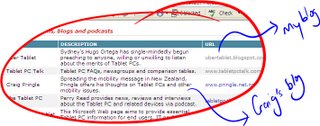
While a lot of the initial commentary is rather vague, and somewhat naive in its description of Tablet PC, i.e. clipboard, and digital signature input, I did however find some very resourceful links. What was also a pleasant surprise to me was mention the UberTablet Blog, and Craig Pringles Blog, in the "Tablet PC forums, blogs and podcasts" section.

Here is a link to the article and below are some of the links they provided (under the heading of "Business Case for Purchasing Tablet PCs"); the webcast on ROI is worth a look at [it requires a very simple online registration], and the Whitepaper on Vista on Tablet is resourcesful too.

Business case for purchasing Tablet PCs

Maximising ROI with Tablet PCs
While tablet PC prices are dropping, the devices still cost more than the average laptop. How do you justify the extra expense?
Webcast

Enterprise Mobility by Forrester Research
How does mobile and wireless technologies affect businesses, their employees, and customers?
Whitepaper (PDF)

Tablet PC technologies in Microsoft Windows Vista
In Windows Vista, Tablet PC shifts into the mainstream. Ink becomes more ubiquitous, integrating directly into the presentation subsystem in Windows Presentation Foundation.
Whitepaper (PDF)

The case for Tablet PCs in healthcare
The Tablet PC, with its versatile form that supports pen navigation, makes it easy for mobile healthcare workers to capture, access, and use information wherever the job takes them.
Whitepaper (PDF)
Read More..

Monday at SWMUG and Tablet PC is OK!

| 0 comments |
Monday the 6th of March 2006 saw Uber Tableteer Hugo Ortega once again join the rambunctious crowd that is Sydney Windows Mobile User Group (SWMUG). Not only is this group a charming, eloquent, geekish conglomerate that demands the latest and greatest from each other, but their also fun to hang out with [I highly recommend you join them once a month for a chat!]


My fist encounter with SWMUG was inspirational, enough for me to come back for a second look - but this time with company. In town was Craig Pringle, Tablet PC MVP from New Zealand, and Dr. Neil Roodyn also a Tablet MVP. While Dr. Neil and I have history together, the tale of the night was how Craig and I met. Craig, upon perusing the internet for Tablet related blogs (now a habitual act) came across my Uber Tablet Blog! We started commenting on each others sites and continued offline our Tablet related banter via Skype; a little ol’ lady sitting next to Craig on his inbound flight even went as far as to express concern over me picking Craig up at the Airport – considering that we’d never had a face-to-face and only met via blogging.


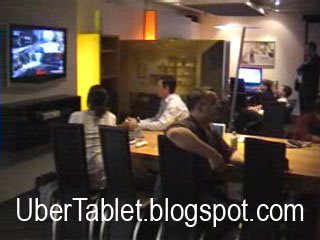
SWMUG is run by Microsft Employee Roger Lawrence, an uberly geekish man that stands over his gathering with much accord. He brought a notebook running Vista (very impressive) to only be challenged to a game of one upmanship by Neil with his Tablet PC running Vista (impressive too). For the evening Roger had managed to negotiate, for the third year running, access to the “XBOX 360 Lounge” (Digital Life Room) within the confines of Microsoft. For those of you not yet exposed to this lounge it is a limited access room only, because once you walk in, theres no real work get’s done!!!


This time I strolled into SWMUG monthly with my Sahara Slate PC under one arm, my sexy Lenovo X41 under the other and a head full of inking. Id been given the chance to talk about Active Words but realised that delegating the responsibility to Craig was a good move, especially when you consider that it was a New Zealander that had Ink Enabled the application in the first place. If you havent tried ActiveWords then I highly recommend it; it really is the multi-purpose programmable button missing on all PCs, Tablet or not.
You can download a fully functional Strokeit. Believe it or not, this app was developed to be used by a mouse on a normal PC; the fact is that when installed on a Tablet PC it is a very powerful tool. (Download Strokeit Here!)

The XBOX 360 lounge Microsoft Australia

The evening was hijacked by the Three Downunder Tableteers (Neil, Craig and Hugo) which caused Dr. Neil to write on his blog: “I was going to give a presentation on ActiveSync development but for various reasons that got side tracked and then canned.” For your pleasure I have recorded a quick pan of the XBOX Room with my digital camera. Be Quick! Have a look before someone from Microsoft forces me to take it down.

During the course of the evening I also managed to sit with Dr. Neil and Craig long enough to record “Talk’n Tablet Downunder – Show #3.”

Read More..

samsung galaxy tab 10 1 the most thin tabled pc you can get

| 0 comments |
samsung galaxy tab 10.1 is the most thin pc tabled that you can get. the thicnesst of samsung galaxy tab 10.1 is only 0.33 inchi. it is 0.001 thinner than ipad 2. first release samsung galaxy tab 10.1 cost $499, cheaper than ael ipad 2 price. but dont worry, samsung galaxy tab 10.2 still be able to compete with aple ipad 2. completly.

samsung galaxy tab 10.1 use a dual-core Tegra 2 processor, 1GB of RAM, two cameras, and 16GB of storage space. althought thin samsung galaxy tab 10.1 have battery that still have long endure.
Read More..