If youre the type that share large documents over the internet then this post is for you.
The widely-known method of sharing files to people at a distance on internet is using emails, but we cant cope anymore with the limitations encountered especially when sharing LARGER files, most email service providers limit the byte size of the file you can send using their email portals.
But with these 14 file sharing websites you can share your large files without any limitation or hassle.
10 best File sharing websites to easily share your large files over the internet
Note: I may not have personally used all of this service, but base on general user rating they offer the best and likely the cheapest way to share you large files online.
Sending and shsring your files with these websites are free, some of them does not even require registering an account with them to start using their services, Almost all of these file sharing websites offer premium service even Google drive.
1. Google Drive
Price: Free
2. Dropbox
Price: Free and Premium
3. Mediashare
4. Box
5. Senduit
6. Dropsend
7. WeTransfer
8. Hightail
9. TransferBigFiles
10. MailBigFile
11. Datafilehost
12. Egnyte
13. Sugarsync
14. OneHub
Showing posts with label your. Show all posts
Showing posts with label your. Show all posts
14 best File sharing websites to easily share your large files over the internet checklist
| 0 comments |Labels: 14, best, Best Android Apps, checklist, easily, file, files, internet, large, over, share, sharing, the, to, websites, your

10 smart tips to make your smartphones battery last longer
| 0 comments |Labels: 10, battery, Best Android Apps, last, longer, make, smart, smartphones, tips, to, your
 |
| 10 smart tips to make your smartphones battery last longer |
Have you at a point in time yell against your smartphone as if its human? The smartphone tech industry is advancing at an incredible rate and coming up with interesting and gorgeous tech devices.
However, its sickening to see the battery as the lifeline of all these devices suffer yet without any improvement.The first generation of phones especially Nokia phones do last for days without without the annoying "battery low" alert.
Many Nigerians regret ever using the Blackberry models due to the fact that they go everywhere with their Blakberry phones charger so as not to go ffline. It was tagged the device with the poorest battery life in Nigeria and Africa.This poor battery issue can be attributed to advanced features in smartphones like the high resolution screens, cellular radio, Wi-Fi, GPS bluetooth and many other features that makes them smart and portable.
Pending the time smartphone batteries will start receiving some attention, here are a few great tips to help you conserve your battery uptime and lifetime.
10 smart tips to make your smartphones battery last longer
1. Avoid performing a hard reset on your phone. Have been told a few times to rmove my smartphones battery while its still on by my network provider.
2. There are areas of low network coverage and if you happen to find yourself in such areas youd conserve your phones battery by turning it off or activating the "airplane mode".More batteries are consumed when your device radio-activity finds it hard to get quality neywork receptivity. Ensure you have quality network signal, you can do these with a cell phone repeater app.
3. Always keep your battery up and charged. Lithium-ion batteries are better charged often before they run dry. Its better to switch off your smartphone and get alternative means of charging once its lower than 25%.
4. Avoid putting your phone on vibration.Vibration in Phones triggers a mechanical force thats runs down battery easily. Mobile devices are meant to be closed to their owners as possible, so try keep your phones volume as low as you can hear.
5. Reduce the brightness, put backlight in quicker sleep mode. smartphones screen due to their high resolution are the biggest battery zappers, you can tweak the settings that your phones backlight only stays on for like 15 seconds or less.
6. Power off Bluetooth. Bluetooth is a radio-active device, it can easily run down your battery due to the fact it trys to find and maintain its signal for good performance. Only use bluetooth when the need be, you can use cable headsets instead of bluetooth.
7. Turn off 3G conections when youre not surfing the web. GSM To make phone calls and do any other activity on your phone you need the GSM network receptivity, when in areas of low network coverage or when not browsing turn off 3G.
8. Dont Use animations on your phone. Transition animations and in the wallpaper should be avoided as much as possible.
9. Get a portable solar or battery powered travel charger for your device, this will keep you up especially when youre in remote places.
10. Get extra battery and power banks. Alternative energy will keep your battery from running dry before the next recharge.
Some smartphone manufacturers like Sony and this Chinese company have begin paying attention to making batteries a lot durable. The future should experience something better in the industry.
How to mirror your android Display to PC
| 0 comments |Labels: android, Best Android Apps, display, how, mirror, pc, to, your

The android platform provides robust opportunity for its millions of users, Android prides a great collection of apps (apk) thereby making it a great choice for smartphone users. What other reason do you think Blackberry manufacturer and the popular telecommunications company like Nokia are now producing android based mobile phones as well?
Back to the heart of our discussion which is helping you mirror your android display screen to PC. You must have heard about some real-tech-inclined devices that helps you to project information across multiple devices. You can as well do same with your android smartphone by using apps dedicated for this function. One of those app is Allcast app for android.
How to mirror android display to PC Screen

*Youll need to first download the Allcast App to your android smartphone if you dont already have it and there after proceed to download the receiver on chrome.
*Now with your chrome browser on PC download the Allcast Receiver app for chrome.

*Then launch the allcast receiver app on chrome browser, to inter-connect both devices youll need to use the same Wi-Fi connection for both devices.
*And Voila!, activities performed on your android devices will be displayed accordingly on your PC
Meet your new language Tutor on Chrome
| 0 comments |Labels: Best Android Apps, chrome, language, meet, new, on, tutor, your
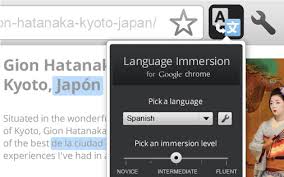
Learning a new language is fun. But it can be much more fun if complimented with this language tutor tool on chrome. There are of course several activities that will usher you into learning a new language like podcasts and watching TV and movie channel in the language of choice.
However, If you think youre not making the desired progress at learning your targeted language, then this chrome app is for you, Ill like you to acknowledge with me a chrome app called Language Immersion for Chrome (LI). LI will easily get you started learning a new language and as well keep you up with knowledge you already have on a language until you master it.
To get started, simply help the language tutor app understand your level of understanding of the targeted language by rating your fluency which is from novice to proficient.
LI will integrate language phrases and words from your chosen language into the web pages you visit on a daily basis, the chrome tool depends on Google translator which provides translation in up to 64 languages.
Download the language immersion for chrome and install on your PC, subsequently, youll see an icon that appears by the right side of the URL bar, simply click on that icon to choose your targeted language and choose how well you can speak the language and youre set for learning.
The tool will slip into the websites you visit a couple of your chosen language, you can easily change the whole page back to primary language in case you get stuck, also available is an option to translate slipped in phrases with voice translation from Google translate.
As your performance improves more phrases are translated into your targeted language until youre able to translate a whole in the targeted language yourself which might mean fluency.
The tool may not be all you need to learn a new language, but it sure can compliment your learning efforts and make learning that language easier and much more faster.
Easily root your Android device with Root Master – Android Rooting
| 0 comments |Labels: –, android, Best Android Apps, device, easily, master, root, rooting, with, your

In market there are many tools available for rooting your android phone. Make sure you use right tools for rooting your android phone. If you use any unknown tool or android app that is not made by professional developer, that app you android phone brick. So always use tool that reviewed by XDA forums and other android forums user.
Root Master Android App: Best Rooting Android App
Root is one of the best tool for rooting your android phone. Root master support lots of android mobile devices. Here you find list of devices that gonna root by root master. This is one click root android app that gonna set all things for your android mobile rooting process.
Easily root your device with Root Master :-
This fast and secure rooting app will give you one-click root access on your Android device to get super user privileges to enable various add ons and enhancements at the system level.Root Master can boost your battery life by optimizing the system and performance of your Android device using that root access give you more control over your device.
With root master you gonna increase your mobile performance and battery life. When you root your android phone you customize all things according to your needs. Best Root Android Apps for your android phone. When you root your android phone you can also install Backtrack on your android mobile.
Root Master gives the following features:
- – One-click root access
- – Unroot ability
- – Install root-only apps
- – Remove bloatware
- – Install custom ROMs
- – Backup app & game data
Root master supported almost android mobile. If you don’t know how to root your android phone check out website of root master. Root is available for android and pc. You can also root your android phone without pc from downloading root master android app from website
Easily root your device with Root Master – If some how android app are not working download root master windows PC program and root your android phone from PC.
Your voice calls can be hacked sooner than you thought
| 0 comments |Labels: be, Best Android Apps, calls, can, hacked, sooner, than, thought, voice, you, your
As the use of mobile devices for business continues to rise, the risks stemming from the hacking of voice communication have increased dramatically. From public embarrassment and backlash to the loss of sensitive or regulated data, the implications are vast.
 Part of the solution is making users aware of the vulnerabilities. Experts advise that anyone who discusses confidential or sensitive information on their mobile phone should assume that they can be eavesdropped on and act accordingly.
However, there’s no need for this awareness to be tempered with fear. Instead, this knowledge can be combined with trusted enterprise security tools that provide effective, end-to-end encryption to protect both business and personal calls. Like most business concerns, common sense and practical tools go a long way toward combating data breaches.
If you’re looking for such a tool to protect your users’ calls and text messages, read this blog to get an overview of SecuSUITE for Enterprise, a software-based solution that works across multiple platforms and carriers, providing end-to-end encryption and peace of mind for mobile communication, or check out the brochure or data sheet on our SlideShare channel.
Read More..
Think you’re not a target? Think again
While spying and hacking may seem like things that only fall under the realm of governments, security organizations, and the occasional celebrity, the reality is that these kinds of attacks are happening to more and more businesses, regardless of size or industry. The statistics are striking:- At the end of 2014, security experts found that mobile attacks had increased four times to over 1 million unique attacks, compared with the same period in the previous year.
- A recent BlackBerry commissioned survey indicated that 68% of CIOs and risk and compliance leaders agreed that mobile devices were the weakest link in their security framework.
Your data can be captured even before you start to speak
Karsten Knol, a cryptography and security researcher responsible for exposing weaknesses within GSM networks, says, “Current commercial interceptors decrypt within seconds, often faster than the time a user takes to answer the call.”The methods will leave you speechless
Hackers are highly nimble and inventive. The following examples show that where there’s a will, there’s a way:- In 2011, researchers hacked GSM mobile calls using $9 handsets.
- The previous year, a hacker also demonstrated how to intercept calls with a $1,500 device.
- More recently, researchers at ANSSI, France’s information security research organization, showed that digital assistants can be co-opted into issuing malicious commands from up to 16 feet away. All that was needed was some fairly low-cost radio transmitting equipment and a headphone used as an antenna.
- As the News Of The World scandal in the UK proved, voicemail can be easily hacked by having two people call a user’s phone at the same time. The first call generates the busy signal, while the second caller is sent to a voicemail prompt. From there the hackers utilized insecure passwords, like 1111, to access the user’s messages.
- A 2015 undercover investigation by an Australian news program exposed vulnerabilities in the signaling system architecture. By giving German hackers access to the reporter’s phone, the hackers were able to intercept and record any of the reporter’s phone conversations with any individual, anywhere in the world, even though the hackers were half a world away.
Raising awareness and security
Part of the solution is making users aware of the vulnerabilities. Experts advise that anyone who discusses confidential or sensitive information on their mobile phone should assume that they can be eavesdropped on and act accordingly.However, there’s no need for this awareness to be tempered with fear. Instead, this knowledge can be combined with trusted enterprise security tools that provide effective, end-to-end encryption to protect both business and personal calls. Like most business concerns, common sense and practical tools go a long way toward combating data breaches.
If you’re looking for such a tool to protect your users’ calls and text messages, read this blog to get an overview of SecuSUITE for Enterprise, a software-based solution that works across multiple platforms and carriers, providing end-to-end encryption and peace of mind for mobile communication, or check out the brochure or data sheet on our SlideShare channel.
How to turn your images into cartoon without using photosphop
| 0 comments |Labels: Best Android Apps, cartoon, how, images, into, photosphop, to, turn, using, without, your
 |
| How to turn your images into cartoon without using photosphop |
There is an online app called befunky, it helps you to cartoonize your pictures without the knowledge of photoshop, with this creative online picture editing tool cartoonizing your images is just a click away.
 |
| img source: blog.befunky.com |
To use the to cartoonize your image, visit Befunky.com/cartoonizer/index.php and then upload the image you desired to cartoonize. You can as well use your webcam, with a simple click youll get your image converted stylishly in a jiffy.
Even more with these tools you can choose the output color of your image.
Source: Befunky
Meet Your Digital Twin Internet For The Body Is Coming And These Engineers Are Building It
| 0 comments |Labels: and, are, Best Android Apps, body, building, coming, digital, engineers, for, internet, is, it, meet, the, these, twin, your


Poll Is it time to cut your KitKat phone loose
| 0 comments |Labels: Best Android Apps, cut, is, it, kitkat, loose, phone, poll, time, to, your
Poll: Is it time to cut your KitKat phone loose?

There are a few problems with older smartphone OS versions. One is security: more ways to exploit software are discovered all the time, and once Google ceases to support an operating system, youre on your own.
Another problem is that smartphones running older software tend not to perform as well as those with newer software. There are exceptions, crippling bugs, etc, but at this point, Android Lollipop is running fairly steadily.
Lastly, Android Lollipop and Marshmallow have a handful of unique and interesting features, which you just don’t have access to with a phone that is stuck on KitKat. Features like Google Now on Tap, and the recent apps menu, to name just a couple.
So my question to you is this: if your phone is stuck on KitKat, and won’t be updated, do you think that now is the time to abandon it?
FASTBOOT METHOD OF RECOVERY TO FIX ALL ISSUES IN YOUR PHONE AND RESTORE IT TO FACTORY STATE
| 0 comments |Labels: all, and, factory, fastboot, fix, in, issues, it, method, of, phone, recovery, restore, state, to, your
Hola Friends,
First things first. If you are not a Xiaomi Redmi 1s user, this post is not for you. I couldnt include that part to the title due to obvious reasons.
When will you need this?
Note that using this method will re install all the basic stuff such as audio drivers etc
Stuff you will need
First things first. If you are not a Xiaomi Redmi 1s user, this post is not for you. I couldnt include that part to the title due to obvious reasons.
When will you need this?
- If you found some issue in one rom that keeps occurring in future ROMs as well, look no further, this is for you.
- If your phone is on a custom ROM and it has so many issues that need fixing
- If you want to get the phone back to factory state in all aspects
Note that using this method will re install all the basic stuff such as audio drivers etc
Stuff you will need
- A PC - we are gonna be doing the flashing via pc
- Fastboot rom - note that the fastboot rom is not the same as the other normal ROM zip file that you use to flash via custom recovery. Fastboot ROMs are larger in size and can be found here
- Minimal adb fastboot set up from here
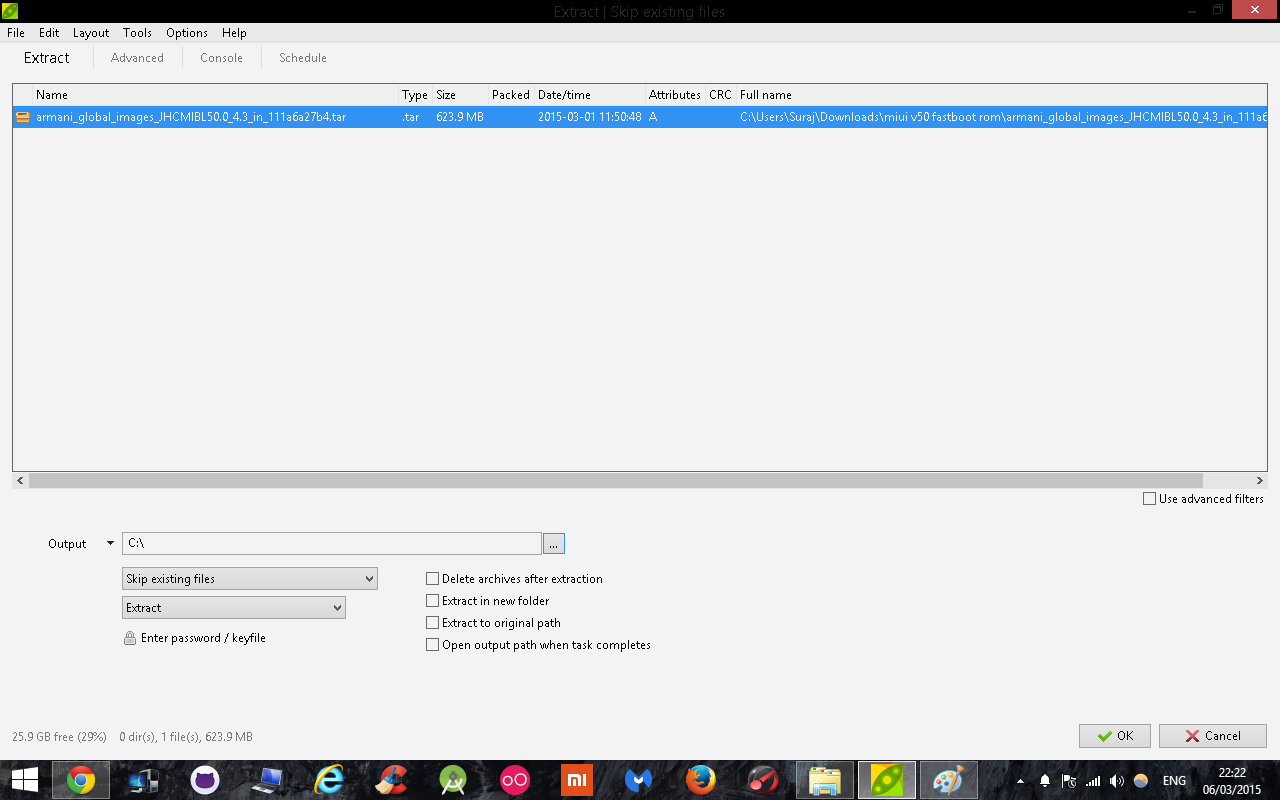
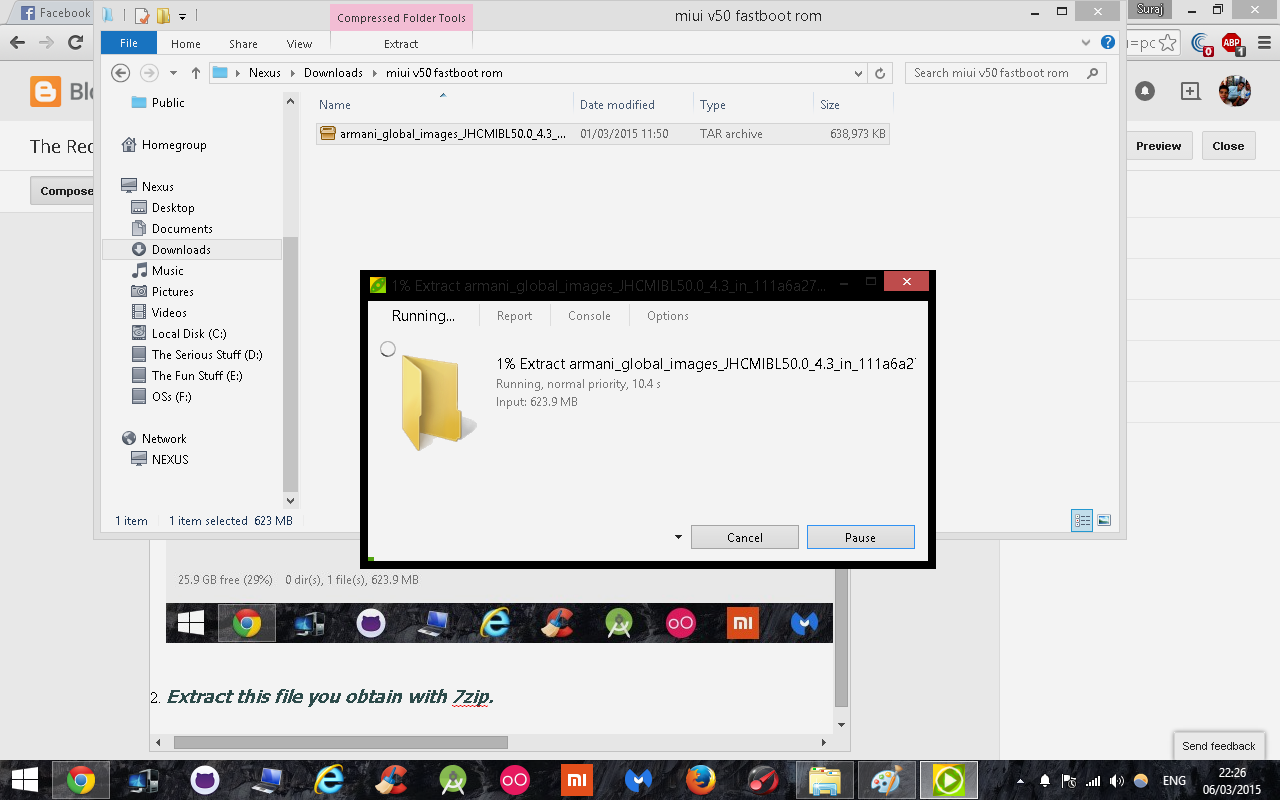
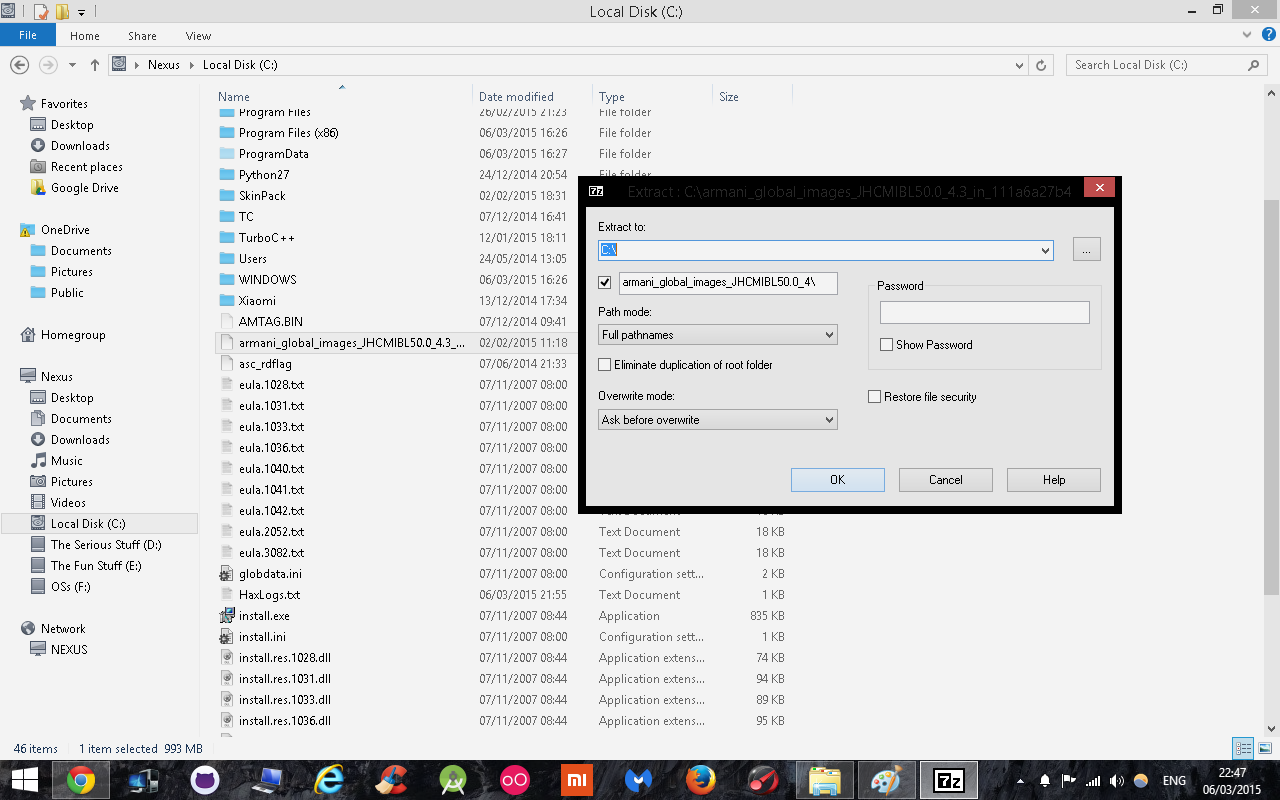
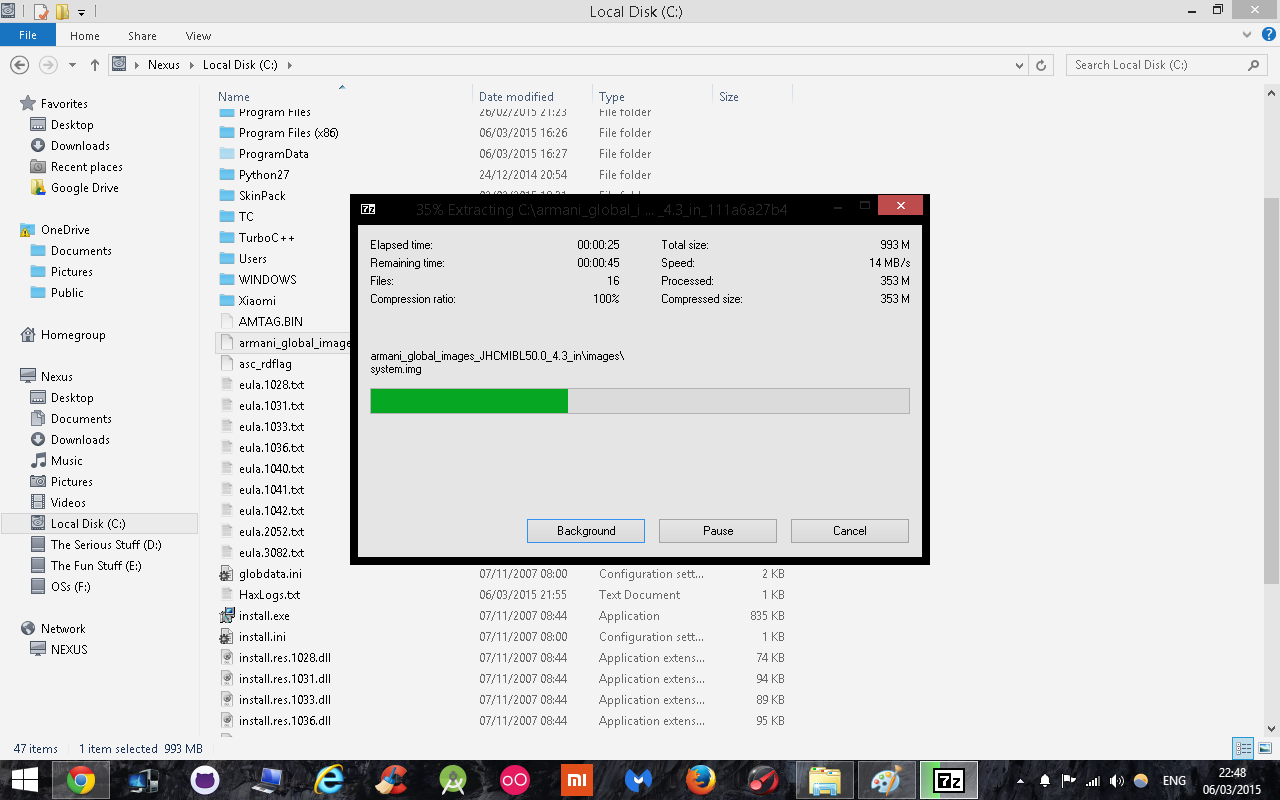
- A .tar file extractor like Peazip from here to initially extract the fastboot rom and another one like 7-zip here to extract the initially extracted file.
Obviously you will need to have a Redmi 1s that can boot to fastboot mode which we will talk about later and a usb cable and the phone should be charged to atleast 60%.
PROCEDURE
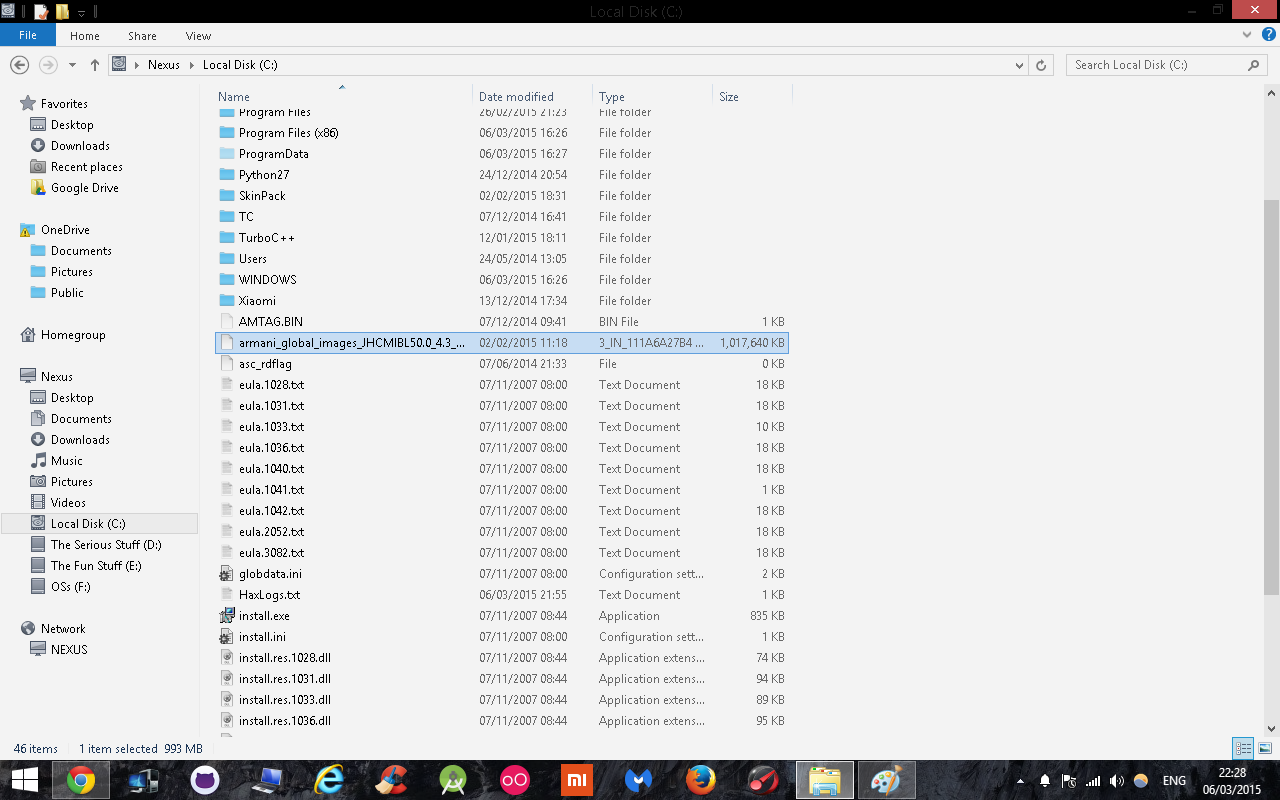
- Extract FASTBOOT ROM in "Drive C:" using Peazip
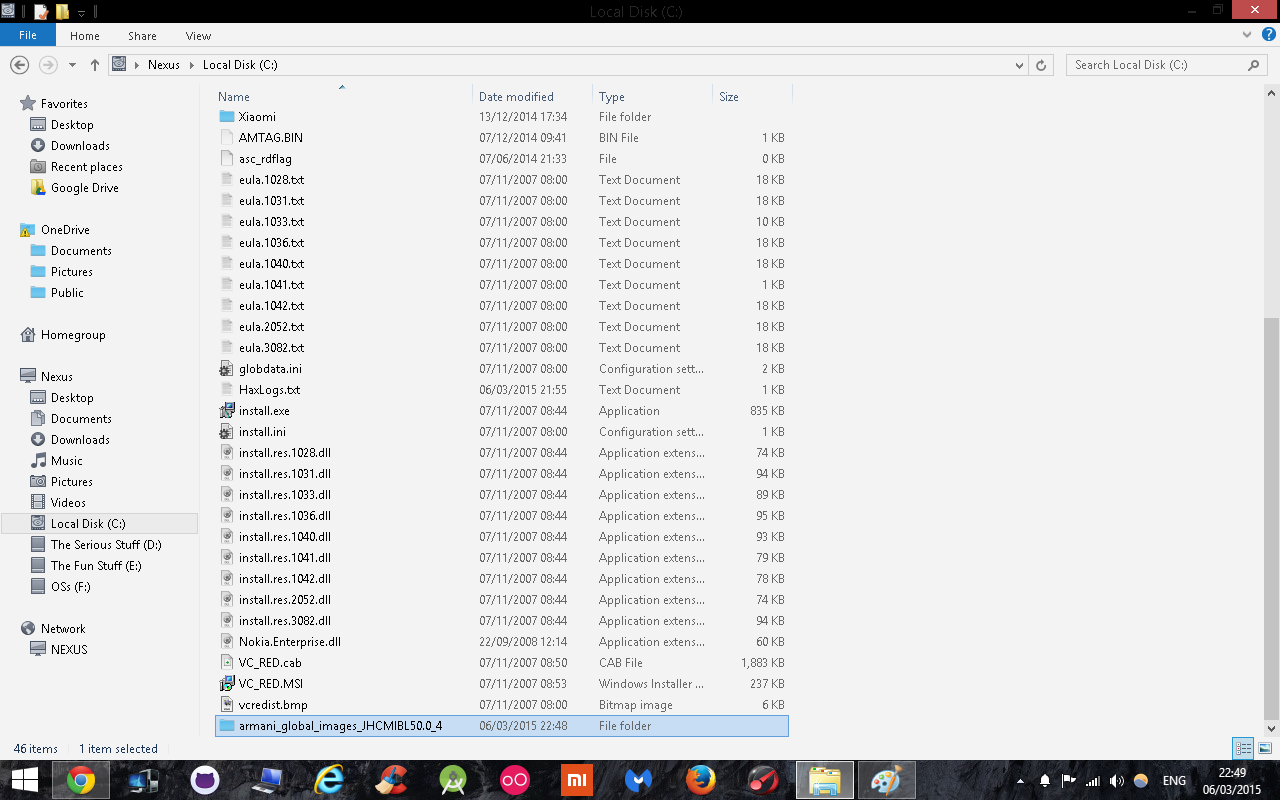
2. Extract this file you obtain with 7zip.
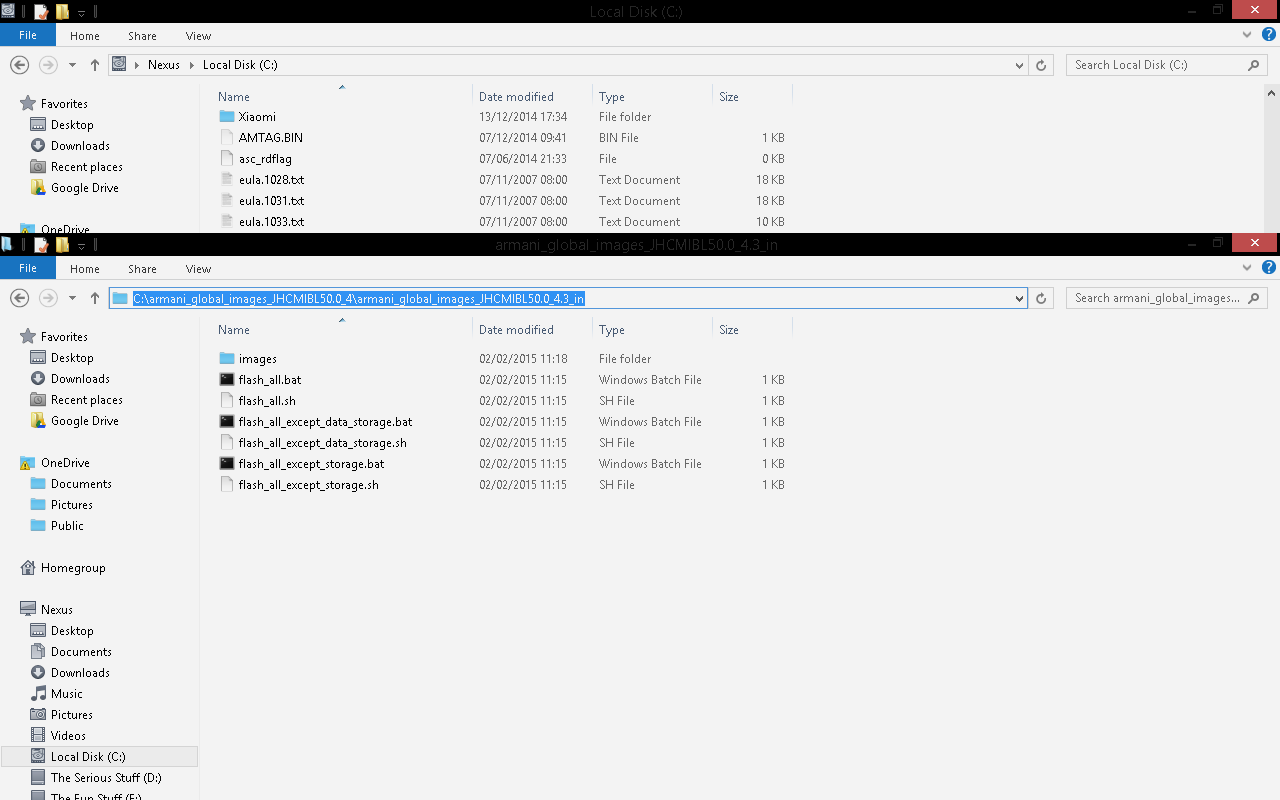
3. Open this folder and the folder inside it and copy this address(ctrl+c)
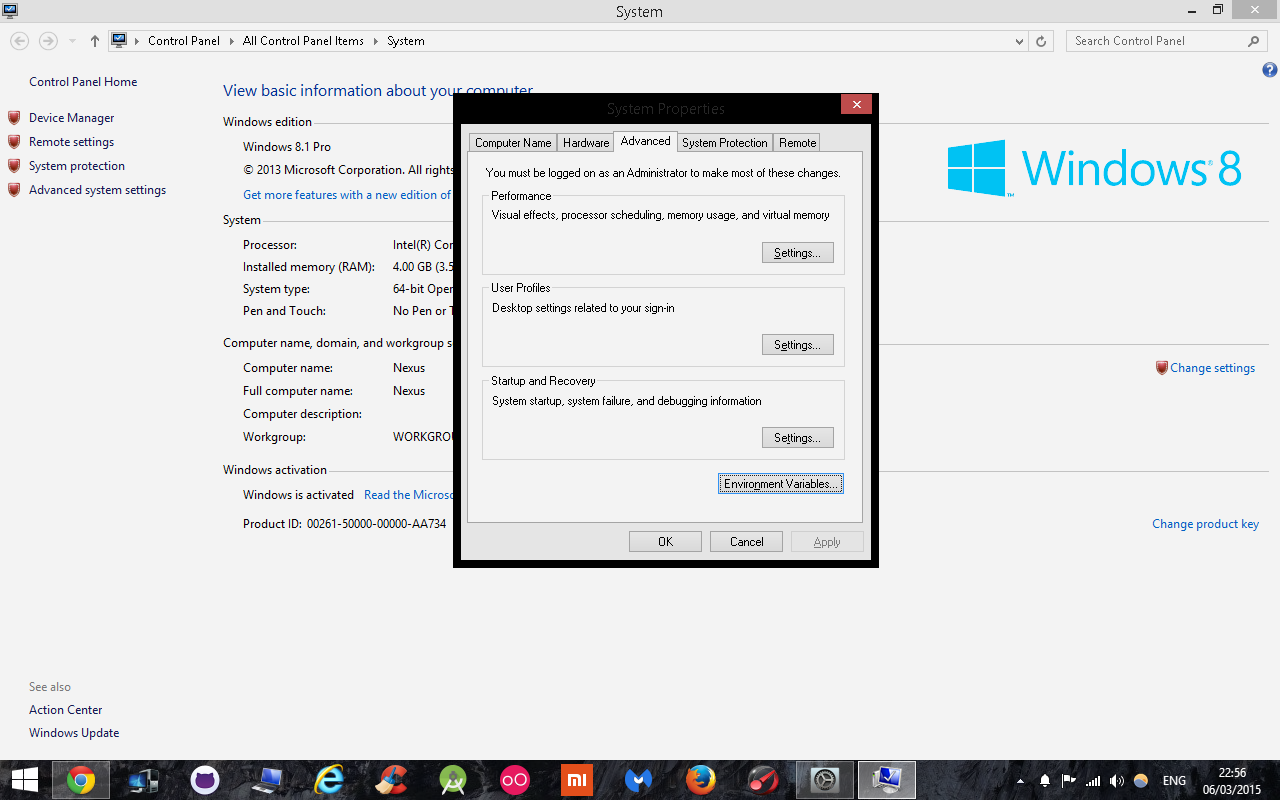
3. Right Click on "Computer" -> Go To Properties -> Then Advanced System Settings
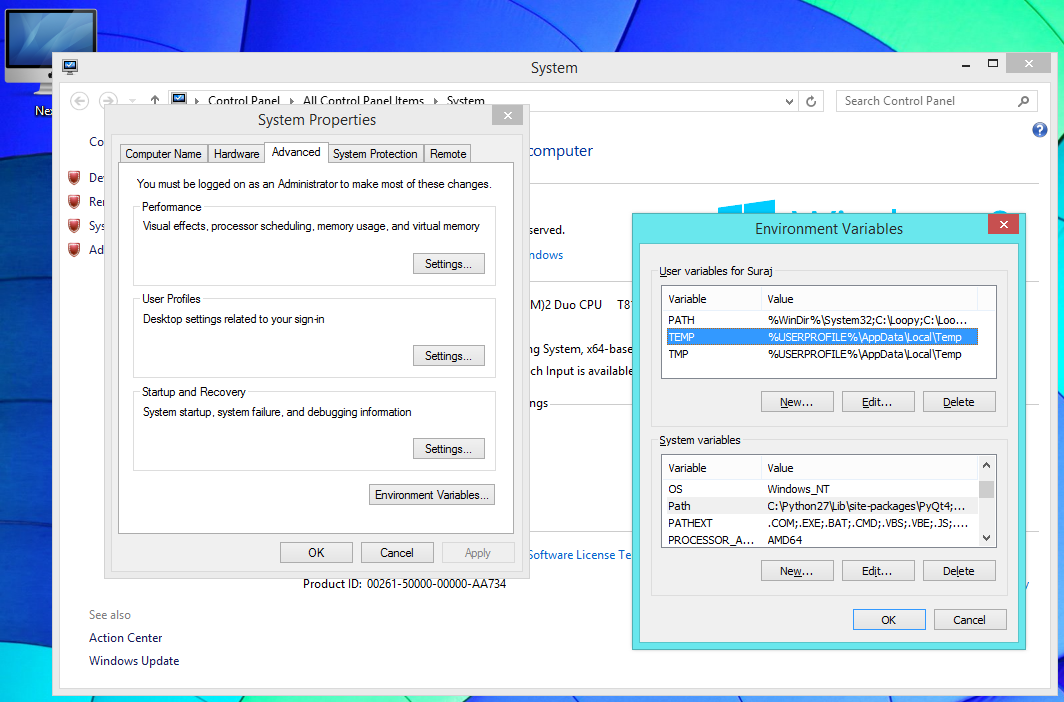
Click on environment variables
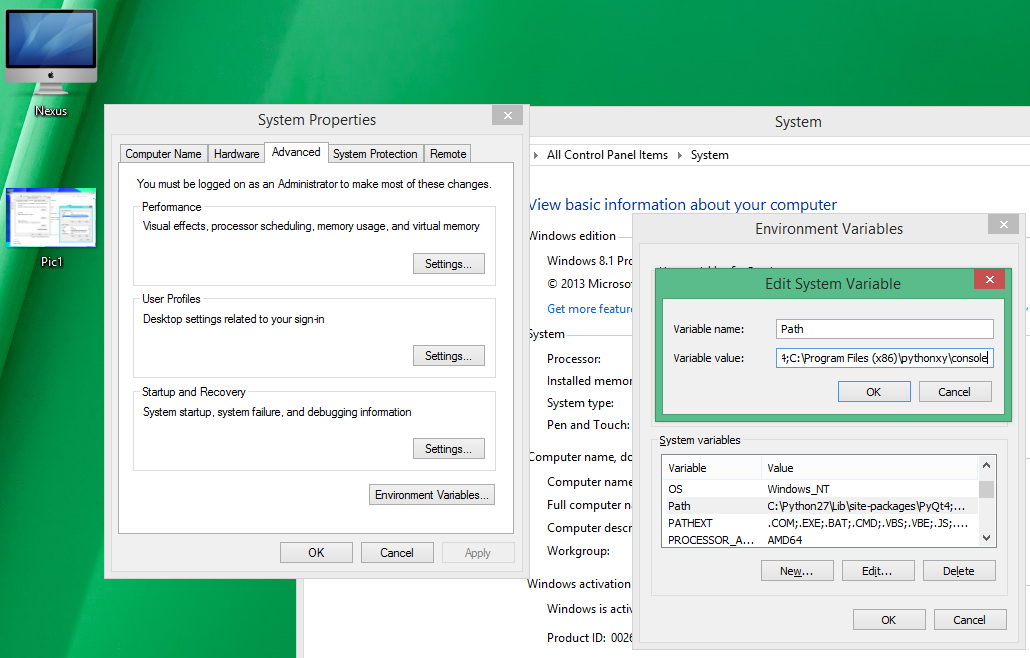
click on temp in the user variables section and path in the System variable section and then click on edit
click in the variable value box and to the end of the text , add a ; and then paste the text copied in step 3 here. Click on OK.
4. Close everything and open My Computer > C and navigate to the place where we extracted the fastboot rom. The address will be something like C:armani_global_images_JHCMIBL50.0_4armani_global_images_JHCMIBL50.0_4.3_in
Here there will be 3 .bat files namely
1. Flash_All
2.Flash_all_except_data_stroage
3.Flash_all_except_storage
Boot your phone in fastboot mode by pressing and holding Power button+Volume down button after switching off the phone.
Next double click on one of the three options you saw above
I would recommend you to go with the first option(flash_all.bat)
Wait until the the process completes and the phone will automatically boot after the procedure is complete.
ENJOY YOUR REDMI 1S IN ITS BRAND NEW STATE!!! :D
In case you have any queries or clarifications, feel free to leave comments below. I shall answer them ASAP!!!
Subscribe to:
Posts (Atom)

